Use Images For Better Looking Forms
 A popular question is how to add images or logos to a form. Formsite allows users at all service levels to add images and there are a few ways to do it.
The basic order of steps to add an image to your form:
A popular question is how to add images or logos to a form. Formsite allows users at all service levels to add images and there are a few ways to do it.
The basic order of steps to add an image to your form:
- Make your image web-accessible
- Locate your image URL
- Add the image item to your form

 WordPress is more popular than ever due to its combination of simplicity and powerful customization features. Users of all kinds—from newbies to power users, bloggers to big-time organizations—can take advantage of WordPress' smart tools to quickly make a brand new professional website.
One of the most popular WordPress features is the ability to add a plug-in to perform a non-built-in function, such as collecting form data or sending an email. Unfortunately, plug-ins come with risks like difficulty installing or configuring, not working with other plug-ins or WordPress updates, or having to constantly monitor and update. Luckily, Formsite forms are easy to embed into your WordPress site and have none of the drawbacks that plug-ins have.
WordPress is more popular than ever due to its combination of simplicity and powerful customization features. Users of all kinds—from newbies to power users, bloggers to big-time organizations—can take advantage of WordPress' smart tools to quickly make a brand new professional website.
One of the most popular WordPress features is the ability to add a plug-in to perform a non-built-in function, such as collecting form data or sending an email. Unfortunately, plug-ins come with risks like difficulty installing or configuring, not working with other plug-ins or WordPress updates, or having to constantly monitor and update. Luckily, Formsite forms are easy to embed into your WordPress site and have none of the drawbacks that plug-ins have.

 Do you have an order form or lead generation form that you want to get more results? Conversion optimization is a recently coined term that essentially means making your form or web page as easy as possible for visitors to complete your ideal goal.
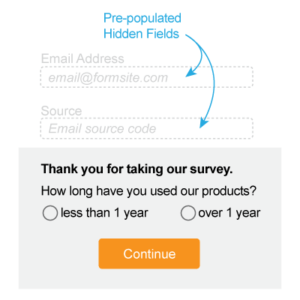 A popular feature of online forms is the ability to personalize the form for each visitor. You can add known information to some form fields to make it easier to complete and reduce the likelihood of errors. You can even add data to hidden fields to track and target certain demographics and behaviors. Our Pre-populate function makes it possible by adding variable text to the URL that tells the form where and what to insert.