Convert Form Results to PDFs

Updated Nov 2019: Our Results Docs now support Microsoft Word templates in addition to PDF templates. See all about Results Docs on our support site!

With our new PDF option for results, you can easily share individual Formsite results in a PDF. This makes sharing, archiving, and printing the results convenient for you or anyone else you share the PDF results with. We've added a ton of new capabilities for taking data you collect with your Formsite form and generating a PDF from a web form. New Features Include:

  • Design your own PDF and populate it with data collected via FormSite
  • Email Notifications can now be sent in several different PDF representations
  • Export all form results into PDFs
  • View and save Results in PDFs
  • Email the PDF version of a form's results to one or more email addresses
Continue reading

Communicate Like a Pro With Mailchimp Integration

We've integrated our service with Mailchimp so that you can now easily communicate en-masse with those who have filled out your Formsite form. Your form can now populate your Mailchimp mail list automatically! In Mailchimp's words:

Mailchimp makes it easy to design exceptional email campaigns, share them on social networks, integrate with web services you already use, manage subscribers and track your results. You'll love mixing and matching Mailchimp's templates, features and integrations to suit your needs? Think of it as your own personal newsletter publishing platform.

How might this be used?
Continue reading

Mission Control

Disclaimer: The post you are about to read is technical in nature and, quite frankly, you likely won't be able to see a bit of visual evidence of the changes discussed here. But trust us!... we have been working very hard behind the scenes on enhancing our technical architecture and code base. With this post, I would like to share what we have been up to and illustrate how we invest significantly in our infrastructure to support our current users and our accelerating growth.

Things have changed quite a bit since we originally built the heart of our system in the 1998 - 2002 time period. It was a different world back then, a different era in Internet years. Ten-plus years ago, there was little in the way of frameworks and persistence layers to build a system like Formsite off of so we rolled up our sleeves and built them ourselves. Our home-grown infrastructure has served us well, but admittedly it has started to become a hindrance due to its complexity and our ever-expanding feature set and user base (not that we're complaining!). In the second half of last year we decided to begin modernizing our core infrastructure using the latest proven technologies, methodologies, and frameworks. We expect these changes to yield significant gains in performance, reliability, maintainability, and flexibility. We also hope that new developer ramp-up time will be positively impacted as there will be less proprietary code to learn.

Continue reading

Smartphone Optimizations

Looking at our traffic from last week, we were surprised to learn that more than 6% of people accessing Formsite forms were using a mobile browser. Our forms work great on mobile browsers, but there are some tricks that can be performed to make them even better when viewed on a mobile device. With our new QR Code functionality we thought we'd help our users design forms optimized for mobile devices. We outline some tips and tricks depending on the device your users have. We break these down into three target device environments: Desktop (default), Desktop+Mobile, and Mobile-Only. Lets dive into some more detail on each of these. Desktop (default): There is nothing new for you to do if you anticipate a majority of your users are using a desktop or laptop computer. By default, our forms are designed for a desktop environment. If you happen to have some users accessing your forms with a mobile device, they will be able to fill them out just fine. If you are not sure if you will have mobile users or not, you might want to make the changes discussed in the Desktop+Mobile section below.
Continue reading

New QR Code Publish Option

Have you ever seen an image like the one below and wondered what it was? It is a QR Code (Quick Response Code), a 2-D barcode technology, that is increasingly popular for use with smartphones and other mobile devices. QR Codes can hold text like URLs ? including the one to your form. Once scanned, the user can automatically load the URL link in their browser.

Our new publish option will automatically generate the QR Code image that contains the link to your form in both standard and secure formats. In order to fully use the technology, you must have a barcode scanning application installed on your phone. On iPhone, some popular scanners are QuickMark, OptiScan, and NeoReader. For Android devices, the most popular scanner is Barcode Scanner.

Continue reading

Enhanced Home Page

Home

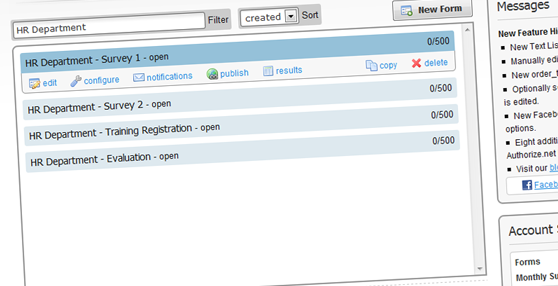
Do you have a lot forms and surveys? We’ve added some new features to our Home page that should make your life easier. You can now sort all of your forms by name, create date, or number of results. We’ve also added a slick new “Filter” box that enables you to filter your form list as you type. So, if you type “HR Department”, you will only see forms with “HR Department” in their names.

Continue reading

Text List Item

Text List

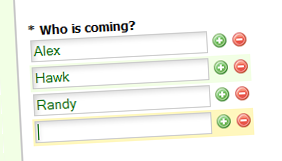
Have you ever needed to collect a variable number of names or answers, but without cluttering up your form with a lot of fields? We’ve got a new Text List item that gives you the ability to collect a list of answers, but only shows one to start. To expand or contract the list, the user simply clicks the +/- buttons. This way, the user can enter exactly the number of answers they need to.

Continue reading

Edit a Result’s Status

Summary Table Status Update

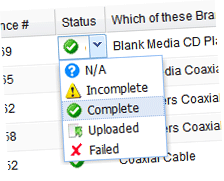
We now provide a way to override the status of a result. You can change the status to any value you would like. Previously, if a status was “Incomplete” there was no way to change it. Now you can change it to “Complete” or any of our other valid statuses. To change the status, move your mouse over the status and select a new status from the dropdown that appears.

Continue reading

New Order Total Pipe Code

The Order Total value of an Order Form is now available to be piped anywhere piping is supported. Use the pipe code "order_total". If you have a multiple page form, you can now display a running total from the previous pages.

Continue reading

Send a Notification after a Result is Edited

You can now configure Notification emails to be sent when results are edited within Formsite. This enables you to better integrate a workflow involving multiple people. You can define one or more Notifications to be sent on initial completion of the form and then an entirely different set of Notifications to be setup when results are edited. Before this feature, many users would manually send out an email telling others a result was edited, approved, etc. Now you can have it done automatically!

Continue reading
Billions of forms submitted