Uncategorized

Bulk Upload Files & Images

Bulk UploadFormSite’s newest release includes a bulk upload tool for files and images. The easy to use drag & drop uploader lets customers with large numbers of files and images quickly upload them to their account. All paid service levels now have access to the new bulk upload tool, located in your account under Account -> Files & Images.
How to use the bulk upload function:

  1. Log in to your account and go to Account -> Files & Images.
  2. Click the Upload button to see the new uploader window.
  3. Drag files into the window or click the Add Files button to select your files.
  4. Click the Start Upload button to begin the upload.
  5. After the upload is complete, click the Close button to return to the Files & Images page.

Technical notes:

  • The bulk upload tool supports common image and document formats: jpg, gif, png, zip, doc, docx, xls, xlsx, pdf. The tool does not support exe files.
  • The uploader will not upload folders – only individual files.
  • The file transfer process will stop when the close button is clicked. Be sure that the upload process is complete before closing the window.


Continue reading

Success Page Tips & Tricks

Your form's success page is an important part of the user experience where form visitors get confirmation that their contribution was successfully recorded, as well as an opportunity for form owners to provide more information. See how your Formsite Success Page can be used for much more than a "Thank You" page.

Continue reading

2 Ways to Customize Your Results

Custom results are a common question topic from Formsite customers. Whether it's a need to automate the layout and design to save time, or a need to apply the results data in a different format, results customization is a valuable part of our service.

Continue reading

Stripe Payment Integration Released

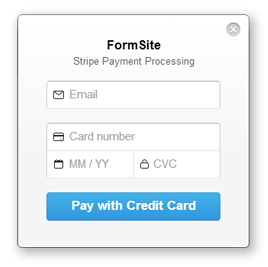
StripeWe have received many requests for an easy payment integration option. Stripe is an extremely easy to use, fast to set up, intuitive payment option that accepts the major credit cards from around the world. Their on-page payment form and simple fee structure make it a very attractive and competitive solution.
At the time of this writing, Stripe is available for customers in Australia, Canada, Ireland, United Kingdom, and United States, with most of the rest of Europe in Beta. To set up a Stripe account and to learn more about this payment option, visit stripe.com. To learn all about how to set up Stripe integration with your Formsite form, visit our documentation page.

Continue reading

Send Form Attachments to Dropbox

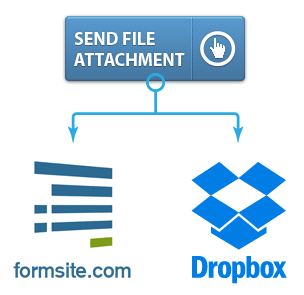
DropboxA new feature for our customers is an integration with the popular cloud file storage service Dropbox. Formsite users can now link individual forms with their Dropbox account to have file uploads automatically copied to a directory of their choosing.

This service allows form owners the security and convenience of multiple locations for their form attachments, as well as the accessibility and notification features that Dropbox provides. Our integration allows customers to select a primary folder to automatically add files, and allows for dynamic sub-folders and renaming to enhance the convenience and usability of the feature.

For new Dropbox users, visit dropbox.com to learn more and to sign up for your free account. To learn more about our integration and to see a video tutorial, visit our documentation page.

Continue reading

Full Cloud Migration Complete

Formsite has wrapped up migrating our architecture to a 100% cloud-based processing and storage system. This monumental task puts the power of cloud computing in our hands with a practically limitless scalable structure. In addition to processing power, cloud computing also allows Formsite to establish servers in geographically advantageous locations to enable faster connections and diverse redundancies.

CloudCloud Services for Customers

Cloud servicing offers our customers the peace of mind that comes with virtual computing and knowing that their data is secure. Since the cloud is made up of a large network of computing systems, data is invulnerable to physical events like hard drive crashes, power outages, or other machine failures. With the cloud components sharing the burden of data storage and processing, the potential for data loss is lower than ever.


Continue reading

New Theme Styles & Colors

The latest Formsite release presents a new set of Themes to the Look & Feel capabilities, as well as an updated default form style. The updated style presents a cleaner experience for form visitors and a more seamless transition for mobile users. The text fields and buttons have been given a larger footprint to provide easier access on smaller screens, and the gradients and shadows have been minimized to lessen form distractions.

Themes

Theme options

The new themes provide color options of our new default style and give form designers the ability to quickly select a personality for their form. Ranging from conservative blues and grays to wild oranges and greens, there is a theme for every subject.

The Customize tools have been modified to allow for more control over common elements and some names have been changed for clarity. All of the previous tools are still available for customers looking to match new forms to old styles. Form designers can either rebuild legacy themes or copy styles from existing forms in their account by going to Look & Feel and clicking the Copy From Form button.

Continue reading

New tools for attachments

The most recent Formsite release gives customers more control over their form results through enhanced attachment processing tools. Exporting results has had the ability to limit the export to a date range for some time now, but targeting files separately has been a frequent request. New in this release is the ability to delete just form attachments, which lets form owners reduce their account file storage, as well as the ability to limit to a specific date range.

Delete attachments

Managing Attachments

A previous release added the ability to export attachments as a zip archive, and this new feature gives form administrators the ability to delete files from form results. An example of the usefulness of this feature is with a form that collects uploaded files, such as a contest submission or photos of items for sale. The form owner can now export the files for safe-keeping, then delete all attachments in a specific date range. This allows you to delete attachments while retaining the other information collected by the form.

Continue reading

Enterprise Customer Profiles

Enterprise Customer ProfilesFormsite enterprise customers are high-volume users whose needs often require extra processing power, higher limits, and dedicated servers. Additionally, our white label options are frequently used to create a seamless integration of Formsite into enterprise websites. Newly added to the site are enterprise customer profiles showing how customers in a variety of industries are benefiting from Formsite services.

Enterprise customers use forms in a variety of ways, including conducting surveys, collecting registrations for events, as an interface for updating customer information, and as a lead generation tool. Developing these forms would typically require an extended design and programming period, along with constant monitoring and results processing. Through Formsite, enterprise customers use the same form builder and results system – but on a much larger scale. Our system eliminates all of the nuisance activities associated with building and maintaining forms, and provides an efficient productivity-enhancing process instead.

White Label services are available for enterprise customers for seamlessly integrating Formsite into their own domains and styles. With white labeling, all of the components of Formsite are custom branded to present a unified and consistent user experience, while still receiving the support and processing power from Formsite. White label customers are provided a dashboard tool that enables them to easily manage all of their accounts. White label customers are also free to charge different prices to their customers that are in line with their value add.

Visit the profiles page for more information on enterprise services and how Formsite is creating solutions for enterprise issues.

Continue reading
Billions of forms submitted