Uncategorized

Conditional Logic tools and examples for more powerful online forms

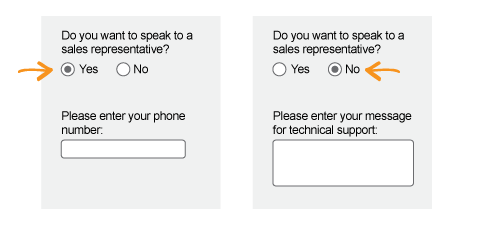
Do you want to do different things based on the answer to a form question? If so, you need to use Conditional Logic. Formsite uses conditional logic to show form items, direct visitors to specific Success Pages, and send email Notifications based on the answers to form questions.

Conditional Logic Tools

One of the most common logic tools is the hide/show function in the form Rules page. Here you can display form items if a previous answer matches the rule. For example:

Conditional Logic
Continue reading

Use Pre-populate links to populate hidden or visible form fields

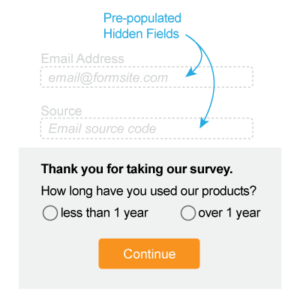
Pre-populate Formsite formsThe pre-populate function allows you to pass values into your Formsite forms and surveys from anywhere you can place a link. This is useful for connecting your form responses to their sources, like email, social media, and other inbound links. An easy example is adding a link to your survey from an email and automatically capturing the email address.

To set up this example, you would first create your Formsite survey with the questions, multiple pages, ratings items, etc. Next, you want to add a Hidden Field item to the top of your survey where you will pre-populate with the email address. The benefit of this method over simply asking for the email address is that you remove the need for the respondent to choose to take the survey again and increase your likelihood of conversion.

Continue reading

Use HTTPS for Secure Forms

https formsAs a response to the higher focus on internet security, Formsite has enabled secure form connections (HTTPS) for all forms at all service levels. Previous to this release, only Pro 1 and higher service levels were able to use the secure form link. This new feature expansion now enables Free and Deluxe service level customers the ability to provide secure form links to their form visitors.

Continue reading

Zapier Connects Your Form With 300+ Apps

ZapierFormsite has added Zapier to its integration list, which allows you to connect your Formsite form with over 300 400 web applications. Using this integration, you can easily create your own web app to automate tasks and use your response data.

Example 1: Build an automated reservation form: Use the integration to connect your Formsite form with Google Calendar to automatically create a calendar event with the form visitor's details.

Example 2: Add a 'tweet this' checkbox to your form and create a Zap to send a post to Twitter when the form is submitted. Use a filter to watch for the checkbox and you've got a smart automated system.

Continue reading

Build a PayPal Form

Formsite makes building a PayPal form easy. Create a form to collect payments for your event registration, e-commerce store, order form, or donation form. Follow the steps below to see how fast and easy it is to set up your integration with PayPal.

Build Your Form

Before connecting to any payment processor, you will need to build your form.
Continue reading

Notification Setup & Tips

A primary function of Formsite forms is to send an email notification when a form or survey has been received. In its most basic form, the notification is simply an email. Our added features make your form notifications powerful, personalized, and much more useful.

Notification Setup

Your new form will not automatically send you an email when your form is completed, so we need to set up a notification at Form Settings -> Notifications. Here you can customize the standard email fields To, From, Subject, and Message.

Continue reading

Responsive Forms Builder

Responsive Forms BuilderFormsite forms are now fully responsive, which means that you can build your form to be optimized for devices with different display sizes. Completing a form on a full-size desktop or laptop computer is much different than completing it on a tablet or smartphone. Our responsive forms builder automatically makes your Formsite forms change for the best possible experience on the device you're using.

To repeat: This setting is automatic for all Formsite forms. You do not need to do anything to enable responsive forms.

How responsive forms work

Continue reading

Section 508 Compliant Forms

Section 508 AccessibleFormsite forms support Section 508 and WCAG 1.0 (Level AA) accessibility standards. These provisions ensure access for people with vision impairments who rely on various assistive products to access computer-based information, such as screen readers and Braille displays. Screen readers translate what's on a computer screen into automated audible output and certain conventions, such form field labels, are necessary so that these devices can "read" them for the user in a sensible way.

Continue reading
Billions of forms submitted