Modernized Form Look & Feel

We are excited to announce that we have completely overhauled the Look & Feel for new forms created at Formsite.com. To keep things fresh, this is our fifth revision to the Look & Feel of our forms in ten years. Existing forms will remain unchanged unless you elect to change them. To keep up with the times, we have changed the default font, added spacing, added a drop shadow, added gradients, and updated our color schemes.
Continue reading

New Form Items (Matrix Items, Coupon Code item etc.,)

Based on user requests, we are introducing 4 new form Items: Star Rating, Coupon Code, Dropdown Matrix, and Dropdown Multi-Scale Matrix. The Star Rating item enables the user to give an item a number of starts on a scale that you define. This Item could be used to have users rate a new movie from 1 to 5 stars.

For Order Forms, we have added a Coupon Code item that can represent a percentage or fixed dollar amount discount. You can define more than one Coupon Code per form. You can also setup a link to Pre-Populate the Coupon Code on your form. This enables you to setup a link from your page that could be something like "click here and save $5 on your order".

Continue reading

Integration With SalesForce.com

Update: The Salesforce integration now sends files from File Upload items to the Salesforce record. Read about it on the Salesforce support page.

We have developed a very powerful integration with Salesforce.com enabling any Salesforce object to be mapped to a Formsite form, including custom objects. Our process is very slick in that we can automatically map your Formsite fields to a given Salesforce object. This means that you do not have to do the manual mapping and that you can have a Formsite form setup and integrated with Salesforce in just a few minutes.

Continue reading

Integration With Google Spreadsheets

Formsite.com + Google Spreadsheets = lots of power. There is no doubt that Google has tremendous functionality in their Google Apps suite and we are now providing you the ability to use a Formsite form to populate a Google Spreadsheet in real-time. This means that you can have your Google Spreadsheet open in your browser and watch in real-time as your results come in. There is no need to refresh your spreadsheet, the results will automatically show. This integration opens up all types of possibilities with respect to sharing data with others. You can share your Google spreadsheet data with others via the Google share feature enabling others to see the form data you collect.

Continue reading

Additional User Accounts

Many of our users informally share the username/password to their account among a small group of people. There is no problem with this and we support it. However, we are introducing a feature that will enable you to gain more control over sharing your account. We are introducing a new Additional Users feature that will enable you to define additional users for your account. You can control whether individual users can only view the form and its results, or update them also.

Continue reading

Account Activity Logging


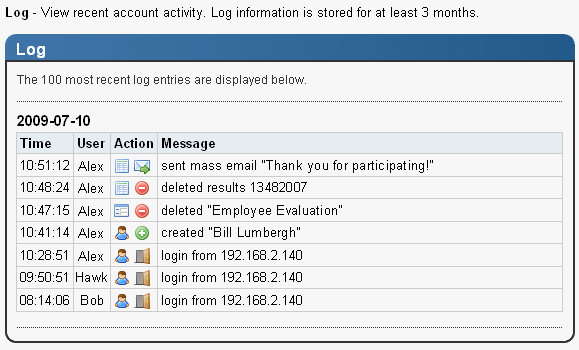
With Additional User Accounts now enabling multiple people to access forms and data, it is time to show an audit log of actions taken within your account including logins, form creation, form deletion, results deletion, etc. We store the User taking the action, their IP address, and the action they took along with the date/time the action was taken. You can view by logging into your account and going to “Account->Log”.

Continue reading

New Search and Result Filters Functionality

Having been one of the original form builders on the Internet, we are used to having our functionality and design copied. If you want to see what our competitors will be up to, you can pretty much just look at our feature list. Our search functionality, to our knowledge, has not been copied. Not a single competitor or any site that we know of has copied it. While we thought our form based search was powerful, intuitive, and unique, we must now concede there are better ways of searching data. We have split what we used to call Search into two separate features: Result Filters and Search.

A Results Filter is a set of criteria that can be applied to form results in order to produce a subset for the purposes of viewing, graphing, reporting, and downloading. Results Filters can be saved and copied. Say you want to graph results for all females between the ages of 21 and 30 that plan on taking a vacation this year. You could define a Results Filter that would enable you to see just this subset of data and then you could perform actions such as graphing and downloading.

We have added a Search link to our Summary Table page. This is a quick search that is simply a single search box that you type into. You can type in anything and all of your form’s data will be searched for the text you enter.

Continue reading

Notifications

With this release, we are introducing a Notifications page as a way to centralize outgoing email for your form. A Notification is a way to send an email each time a user submits your form. You can send information to yourself, to a list of people, or to the user who filled out your form. There is no limit to the number of Notifications you can create or use. You can also specify criteria for your Notification being sent so that the Notification is sent based on answers selected on your form.

Our past versions of Formsite required you to go to different places within our site to define Auto-Responders, Results Receipts, and Results Emails. With our new Notifications page, theses can all be defined in one centralized place. Along with the centralization of email comes much greater functionality. For example, you used to define the auto-response message as part of an Email Address form item. Now, you can define multiple auto-response messages and determine which one gets sent based on the answers your users provide. You can also put multiple Email Address items on your form and define one or more different Notifications for each Email Address.

Continue reading

Funneling

Ever want to have the questions on your survey drill down to gather more detail based on previous responses? Our new Funneling option enables you to ask a question like, “What brands of shoes have you heard of?” and then follow-up on the question by asking additional questions about only the brands of shoes the user selected. So, you could then ask, “What brands of shoes have you purchased?” and the available choices would be those shoes identified in the first question. You can chain these new Funneling questions together across multiple questions.

Continue reading

Form Login – Save Partial Work

Our Form Login feature is popular for people that want to partially complete a form and return later to finish completing the form. Previously, we made users successfully complete a given page in order to save any work. This necessitated that forms be broken up into multiple pages in order to really take full advantage of this feature. With this release, we are introducing a “Save Partial Work” button that will be next to the submit button. This button enables the user to save what they have entered regardless of if they have completed all required fields on a given page. This feature is only available for users that setup a Form Login username/password for purposes of updating their form. Additionally, we have added functionality so that the Formsite account owner can now update and delete login details for individual users.

Continue reading
Billions of forms submitted